Breakfast…just the word makes me hungry. Or how about some sweet treats? Or a tall glass of tart lemonade? Is your mouth watering yet?
Well, join me as we learn to draw these scrumptious morsels with today’s how to draw cute food tutorial! 🎉
How to Draw Cute Food
You’ve probably noticed that drawing tutorials about food are some of my favorites. I’ve previously created:
This tutorial combines those elements and adds more to create the cutest little pictures.
There’s a group of breakfast food, lemons and lemonade, and some adorable sweet treats.
While my goal is always to help you and your kiddos artistically, here are a few ideas for using these (and any) of the tutorials:
Use them for booklet covers
These printable pages are the perfect size for a small booklet. Draw your own pictures on the side with the blank grid, color both pictures, and fold it in half. That will put your hand-drawn side on the front cover and the “guide” picture on the back cover. On the blank inside pages write your “book”.
What to write about? How about creating a story around that topic like kids having a lemonade stand to earn money for something special or maybe the dirty dog that burst through my back door and interrupted my breakfast? Be creative and use the pictures as a springboard for ideas.
Use them as fact, nutrition, or recipe books
Gather nutrition facts on breakfast, or sweet treats or drinks and put those in your booklets. That would be especially great for those dieting or trying to reach a health goal!
Why not create some recipes in there too? Put your favorite breakfast recipes in the book or some great lemonade drink recipes. Buy a box cake mix and add some special ingredients (think candy bars cut up) to the batter and write down the ones you liked.
These are all fun ideas that you can do together, and together is what it’s all about. These are the memories your kids will hold onto in their hearts. Go make some memories! 💎
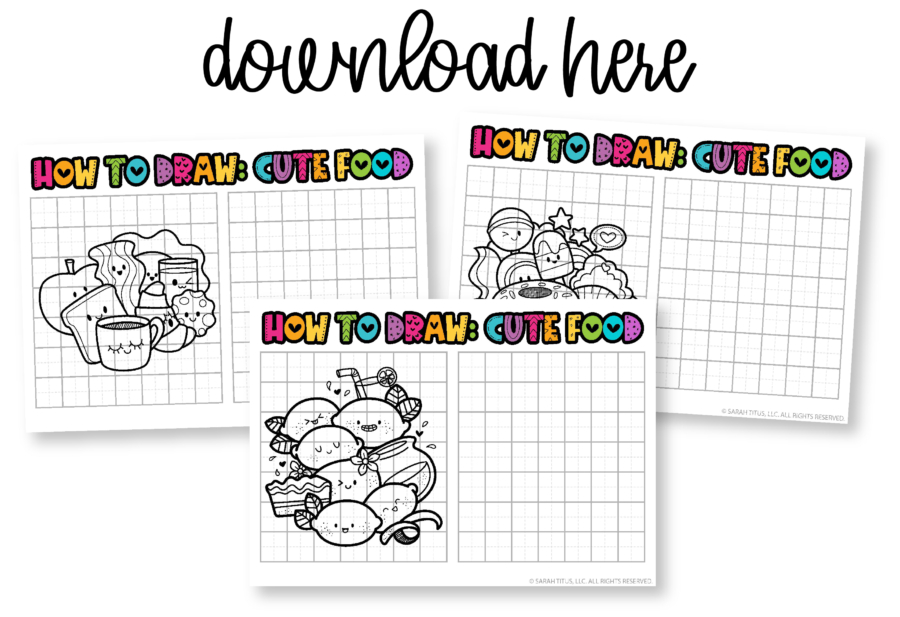
Download the how to draw cute food here.
• Other printables are either functional OR cute. I bridge the gap between the two. Since I'm a single mom and don't have time to mess around and am a kid at heart, I love something that actually propels me forward and gets the job done quickly, while still having that super cute vibe I'm known for.
• I'm a graphic designer FIRST. This means my printables, whether free or paid for, will always be of the highest quality and print crisp and clear on any printer.
• I love what I do and I do the work myself. I'm not hiring these out. This is my life, my hobby, my passion, my heart.
• My fans are obsessed with my work. To date, I've made over $23M on printables alone (organically) in the past 8 years.
Yes! Except for some large binders, all printables on the blog are 100% free for personal use. I make these because I genuinely want you to have something cute and helpful right now without having to spend a dime. You deserve a life that feels more peaceful, more organized, and more you, and if a simple printable can make your day feel lighter, I am so happy to give that to you.
Printables, graphics, backgrounds, SVGs, fonts, and design elements on this site are for personal use only. You may not alter them or redistribute them for free or monetary gain without written consent from the author, Sarah Titus. If you want to share these resources with others, please share the link to the blog post. Teachers & Churches: You may share these with your classes, colleagues, and congregation as long as they are not edited in any way.
Absolutely! You're welcome to print as many copies as you need for your own students or church groups. I only ask that you do not edit them in any way (leaving the full copyright line in tact) or sell them or host the digital files on other websites. Please always link back to this post to share with others.
• For best results, I recommend using standard 8.5"x11" white paper. Since these are professionally designed as high-resolution PDFs, they'll stay crisp and clear on any printer. To print, simply download the PDF to your device and open your printer settings. Select "Fit to Page" to ensure the printable looks perfect.
• If you're printing stickers, I have a tutorial here.